The issue
As a sales manager and Hubspot enthusaist with years of experience, I have always strugled to optimise sales team performance and task-management.
Following up with your prospects / leads is often tedious work. But, everyone working in sales know that it is much needed and pretty much non-avoidable. It takes a lot of manual emailing or calling to reengage with potential long-term clients.
Hubspot doesn’t unfortunately support automatic follow-ups as a separate feature. But, this article is about how to build workaround.

Resources needed
1 Hubspot Sales Enterprise package
2 Pipeline
3 Connected email account for sequence
4 This article 😉
Steps
1 Establish sales pipeline
2 Have a working sequence in place
3 Establish workflow to sequence enrollment with custom trigger
4 Test automation
First step - Pipeline
Each business has an operational workflow of their own. One thing that is pretty universal, we all have to follow-up with our prospects at some point.
Sales pipeline should reflect your sales reps flow. Usually, the first stage is “initial reach out”(phone, email, meeting, etc.) and the second stage is Follow-up stage.
In this case, let’s take Follow-up stage as an example. Sales rep would call or email the prospect and then move their deal card to Follow-up stage.
We will use this action as trigger for enrollment.
Second step - Having a working sequence in place
Hubspot has a pretty extensive knowledge-base on how to create and send out sequences.
Quick sequence tutorial is:
1 You have to connect sales reps inbox to Hubspot (private email, team emails won’t work!)
2 Add custom digital signature for the sender
3 Sender needs to have Paid Enterprise Sales seat assigned to them
4 Open sequence editor and add an template and all steps needed. In this case – an automatic email.
TIP: You can create multiple automatic follow-ups in same sequence with time delays based on your sales and lead nurture strategy
LIMITATION: They can send maximum 1,000 automatic emails per day
I’ll post more sequence tips & tricks in another post.
Third step - Establish the workflow
What is the trick here? You have to use Hubspot workflow to enroll clients in automatic sequence based on deal stage status.
SALES PROCESS
1 Sales rep will talk to a prospect and after sending proposal or initial email they will move their deal card to Follow-up stage
2 If the client doesn’t reply in next i.e. 5 days client will be enrolled in the automatic sequence and will get automatic follow-up email. If client replies sales rep needs to move card to another stage to stop the workflow.
Workflow editor
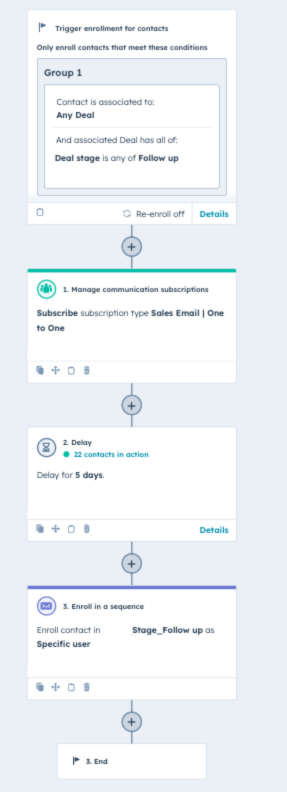
First step – Choose your trigger for enrollment of contacts. In this case it will be:
- Contact is associated to: Any deal
- Deal has all of: Deal stage is any of Follow up
Second step – Manage communication subscription.
You will select: Subcribe to: Sales email I One on One. (Important: This step is only for improving deliverability. If you have to be GDPR compliant and have a specific policy, you can either skip this step or consult with your GDPR officer or consultant)
Third step is Delay. You will choose amount of time that works well in your sales strategy. Important thing is: your sales reps need to know that after i.e. 5 days automatic email will send out.
Final step – Enroll in a sequence
In the final step you are enrolling client in the sequence. When customising workflow you can choose sender, the sequence email will go from etc. Beauty of sequence is that the email will look as 1-1 email, not an email marketing campaign.
Please note: If you are enrolling more than 50 c0ntacts, emails will send out in batches of 50. with a short period of wait between them (a few minutes)
Hubspot ROI
TEST, TEST, TEST
It might seem obvious, but testing is a big part of every automation. I suggest taking a few test leads and enrolling them in the workflow with small delay (i.e. 5 minutes) and check if workflow is executed properly.
Workflow tool has enrollment history and troobleshoot tools that work pretty well.
CONCLUSION
Final TIPS:
- Test out different triggers with this workflow. Triggers can be: client activities, property change, deal stage, contact properties etc.
- Be sure that the automation is aligned with your sales process
Most companies use only a fraction of HubSpot's capabilities. From CRM setup and sales pipelines to automation, reporting, lead scoring, and lifecycle tracking, a properly configured HubSpot instance can dramatically improve your marketing and sales performance.
Whether you're implementing HubSpot for the first time or trying to get more value from your existing setup, expert guidance can save months of trial and error and help you generate more qualified leads.
Ready to unlock the full potential of HubSpot? Book Your Free HubSpot Audit →